Overview
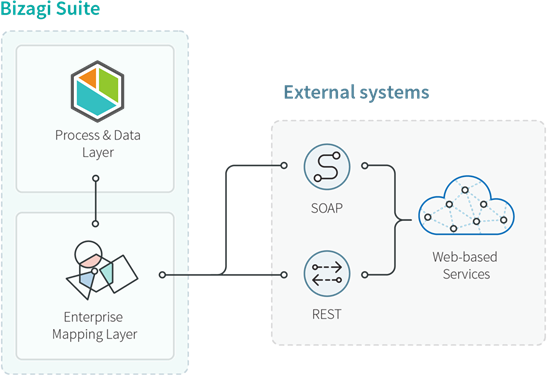
Bizagi provides an integration layer that enables easy integration with existing applications through multiple alternatives.
Using this integration layer, Bizagi processes can communicate directly with external systems to retrieve business information or update data. One of its main features is the Web services connector, which allows processes to invoke external services through standard web protocols such as SOAP.
|
For other B2B integration alternatives, including Bizagi Connectors, see Bizagi connectors. |

Before you start
Bizagi includes a Proxy configuration option that can be used when connecting to external services through the Web services connector.
When should you use the Web services connector?
Consider a Credit Request Process where you need to query a Credit Bureau or another external system to verify whether an applicant appears on a blacklist or to evaluate their borrowing capacity.
As illustrated below, business processes often include multiple integration points where external services must be invoked:
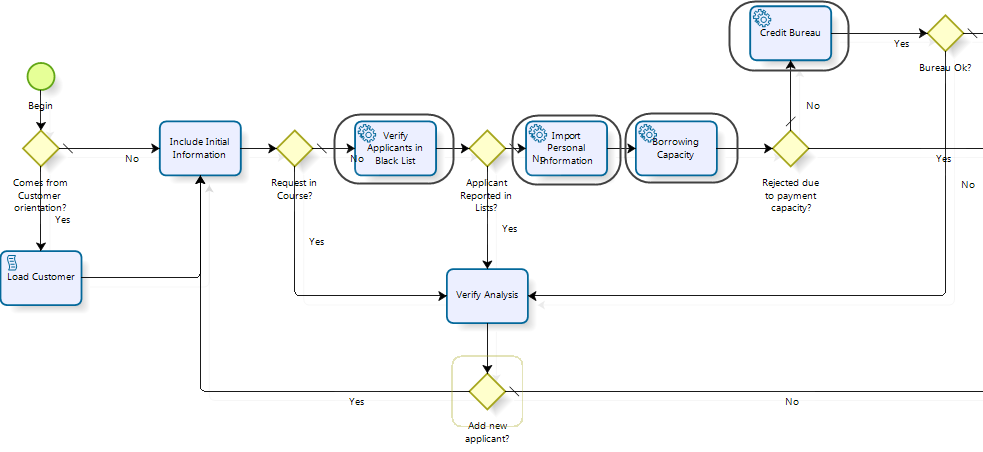
In Bizagi, this type of integration is configured through the Web services connector, which can connect to standard SOAP web services and RESTful services hosted either within an internal network (intranet) or on the Internet.
How it works
When a process invokes an external service, Bizagi sends information from the process instance as input to that service.
The service response is then automatically mapped back to Bizagi and stored in the process data model.
Information exchange between Bizagi and the external service, whether the service is hosted in an Enterprise Service Bus (ESB), in the cloud, or in another system, is performed through standard XML messages. This approach makes the integration independent of the platforms, technologies, or programming languages used to implement the service.
To configure a web service invocation, whether SOAP or RESTful, the Web services connector provides a guided, graphical configuration experience that requires no programming.
Important
To invoke external services from Bizagi processes, it is recommended to define integration points using BPMN Service Tasks.
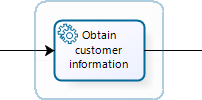
Using Service Tasks allows you to specify whether the service invocation is executed synchronously or asynchronously. For more information about asynchronous execution, see Asynchronous Activities.
|
When the value returned by a service exceeds the maximum length of the target String attribute in Bizagi, the value is automatically truncated to fit the attribute size. |
About the Web services connector
Integration points are configured in Step 6 of the Process Wizard in Bizagi Studio, Integrate, by selecting the Define integration interfaces option.
From this step, you can configure invocations to external services through the Web services connector.
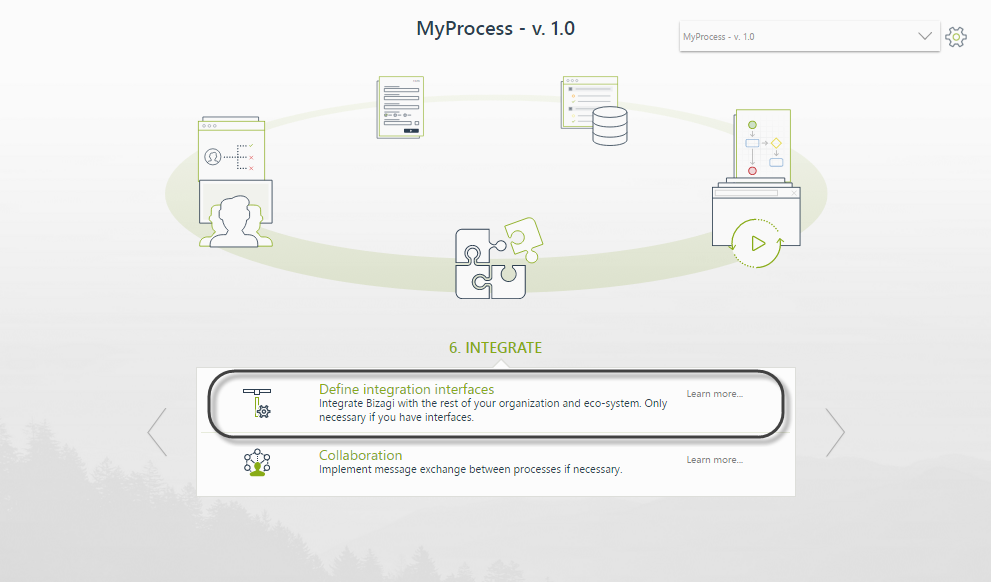
After selecting the Service Task where the integration will be configured, Bizagi launches a guided four step configuration wizard.
The available options may vary depending on the selected service type, SOAP or RESTful.
For RESTful services, Bizagi recommends using Bizagi Connectors whenever possible. Bizagi Connectors provide advanced capabilities such as custom headers and OAuth authentication.
Standards supported by the Web services connector
The Web services connector is a generic integration component that can consume web services hosted in an ESB, the cloud, or external applications.
For SOAP web services, the following standards are supported:
•SOAP 1.1 compliant Web services.
•SOAP 1.2 compliant Web services
|
•SOAP web service invocations must use the POST HTTP method. •REST service requests and responses must use XML format. •WSDL 1.0 is supported. •WSDL 2.0 is not supported. |
The following WS-* extensions are also supported:
•WS-Addressing
•WS-Policy
•WS-Trust
•WS-SecureConversation
•WS-Security, including:
oUsername Token authentication
oBinary Security Token authentication (WS-Security 1.1)
For Binary Security Token authentication, message encryption requires the service to publish a public key in its WSDL definition.
|
•The WS Connector supports WSDLs that expose multiple methods and multiple ports. •Support for multiple ports is configured through Advanced interfaces configuration. •WSDLs that expose multiple services are not supported. |
If you need to invoke a SOAP web service that relies on unsupported WS-* specifications, such as WS-Discovery, or if your integration scenario requires functionality not supported by the connector, such as invoking a service once for each record in a collection, use one of the following alternatives:
•Bizagi Connectors (recommended)
•Component Library
For guidance, see How to choose the right integration feature.
SOAP and RESTful services comparison
The following comparison provides a high level overview of the differences between SOAP and RESTful services.
|
SOAP web services |
RESTful services |
|---|---|---|
Concept & objective |
Bound by a strict protocol definition, SOAP is oriented toward exposing pieces of application logic as services (operations). |
Focused on exposing named resources through URIs. Since it is protocol independent, it is well suited for Internet applications and mobile access, where the primary goal is exposing data. |
Formats |
Relies heavily on XML for information exchange. |
Commonly uses JSON, a lightweight format that is optimal for Internet applications and mobile environments.
Other formats, such as XML, can also be used. |
HTTP methods (verbs) |
Mainly uses POST.
Some web services may also use GET, although this is less common.
SOAP is not necessarily bound to HTTP or HTTPS. |
Uses: •POST to create resources •GET to retrieve resources •PUT to update resources •DELETE to remove resources
Some services extend update capabilities by implementing the PATCH method, which sends only the modified information. |
Security |
Usually implements WS-Security and other WS-* specifications.
These capabilities are available in addition to TLS/SSL. |
Typically relies on OAuth to protect resources.
TLS/SSL can also be used.
|
Advantages & disadvantages |
•Commonly used in enterprise intranets, especially when there is a need to distribute and manage transactions with a higher level of sophistication, such as ACID transactions, and enhanced reliability. •SOAP web services use a descriptor file that enables clients to consume them in a standardized way with relative ease, since machines can interpret their inputs and outputs automatically. |
•Well suited for modern applications and technologies, and is often considered to provide better performance and scalability. •RESTful services are generally faster to develop. However, client applications that consume RESTful services may require additional effort because RESTful services do not use a standard descriptor file. Their inputs and outputs depend on the implementation of each service, and there is no single standard definition that applies to all RESTful services. |
Examples
For additional information and practical examples, see:
•Invoking a Web Service from Bizagi
•Invoking a REST Service from Bizagi
Last Updated 8/27/2026 1:27:55 PM